Restore faded photos before the emulsion ghosts away
Fading often looks like flat contrast and vanishing micro-detail, not just “less color.” PhotoSharpener targets the mushy midtones and grain that remain, using Real-ESRGAN to reconstruct texture while cleanup lifts blocking from re-saving scans over the years.
- Max output
- Up to 4x
- Avg. time
- ~8s
- Formats
- JPG - PNG - WebP

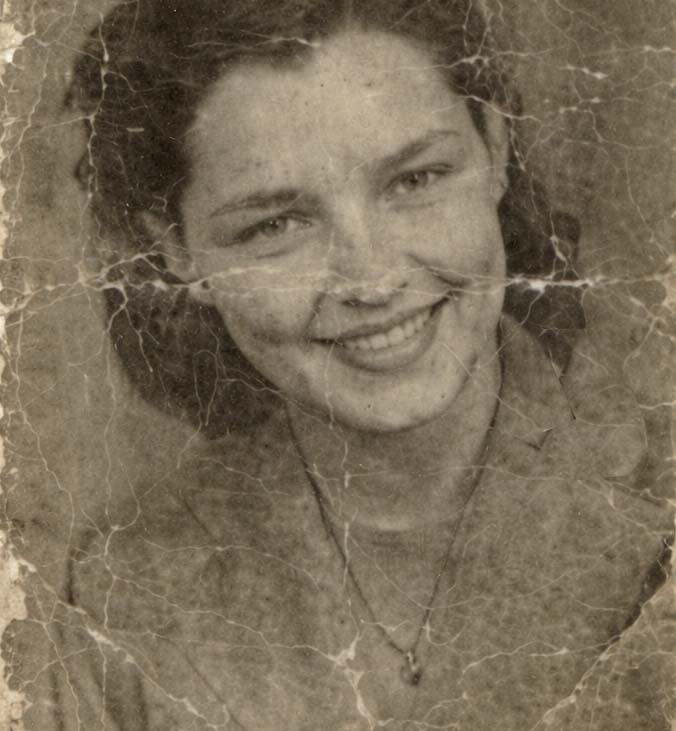
Recover structure, not just saturation
We lean on super-resolution to bring back believable texture in highlights and shadows, then let sharpening and denoise finish the file so it survives reprint or social sharing.
Digitize the print evenly
Soft window light or a basic scan bed both work—avoid harsh shadows across the paper.
AI rebuilds micro-contrast
Real-ESRGAN reintroduces detail that flat dyes swallowed; GFPGAN helps faces if present.
Export for album or frame
Add resolution (up to 4×) when you need modern print sizes.
Bring Faded Prints Back
Upload a faded photo scan—we sharpen structure and reduce analog mush.
Contrast curves guess; models infer texture
Pushing Levels in Photoshop can blow highlights. Super-resolution predicts what detail probably existed in those washed-out areas, especially on fabric and foliage.
Texture-first AI
Rebuilds believable grain structure instead of plastic smoothness.
Edge rescue
Keeps lettering and borders from dissolving.
Upscale for gifts
Small wallet prints become wall-worthy with 4× headroom.
Faces fade fastest in old chromes
GFPGAN offers a dedicated path so cheeks and eyes return without inventing new people—important for heirloom color prints.
Natural skin return
Less wax-doll reconstruction.
Eyes readable again
Critical for emotional connection in reprints.
Group fades
Everyone benefits evenly.


Denoise + de-block before sharpening
Faded scans are often double-JPEG’d from email—cleanup prevents those blocks from turning crunchy.
AI sharpening
Finishing pass after reconstruction.
Face restoration
Optional GFPGAN for people-centric fades.
Compression repair
Removes artifacts that mimic fading.
Batch for studios
Paid tiers for whole shoeboxes digitized at once.
Restore faded photos honestly
What AI can do for sun-bleached chemistry—and what still needs a rescan.
You will see richer structure and contrast, but this is not a dedicated color-grading service—severe dye loss may still need manual color work after AI detail returns.
A fresh high-DPI scan always helps. If that is impossible, AI can still extract more from the best file you already have.
Yes—up to 4× resolution for modern print sizes.
Files delete automatically post-job; encrypted transit end-to-end per our product story.
Heavy water spots or mold may still need clone work—AI focuses on digital detail recovery, not physical stain removal.
Related tools
Upload the faded scan, see detail return on the slider.
Reprint gifts, slideshows, or genealogy sites with files that finally hold up on retina screens.
- Auto-deleted uploads
- ~8–10s turnaround
- Up to 4× output