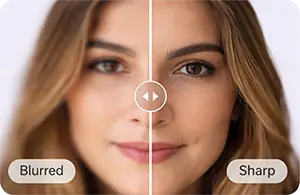
AI Sharpening Basics
How much detail can AI recover from a blurry photo?

TL;DR
- AI can recover meaningful detail from a mildly blurry photo, especially when edges, facial features, or textures are still partly visible.
- The best cases are slight motion blur, mild focus misses, soft scans, and compressed phone photos.
- AI cannot pull back detail that was never recorded. When a face is just a smear or motion streak, the result becomes plausible reconstruction, not true recovery.
- Your best results usually come from using the cleanest original file, fixing noise first when needed, and only upscaling if the image is also too small.
- PhotoSharpener is a good quick-fit option when you want browser-based blur cleanup, upscaling, and face-friendly enhancement in one flow.
If you are wondering how much detail AI can recover from a blurry photo, the honest answer is: often more than a normal sharpen filter can, but not nearly as much as marketing pages imply.
AI works best when the photo is still readable but soft. If the eyes, hairline, fabric edges, text, or object outlines are still partly there, a good model can make the image look noticeably cleaner and more usable. If the image is badly smeared, heavily out of focus, or tiny and compressed, AI can still improve it, but some of what you see will be educated guesswork rather than literal recovery of the original scene.
That distinction matters because it changes expectations. If you need a family photo to look clearer for sharing, printing, or a keepsake, AI can be a big help. If you need forensic certainty from a ruined file, it is the wrong mental model. The practical goal is usually not "recover every lost pixel." It is "make this image look natural, believable, and useful again."
What AI can realistically recover from blur
Mild blur gives the model something to work with
The strongest results happen when the original photo still contains structure, even if it looks soft at first glance. A slightly missed focus point, minor hand shake, scanner softness, or light compression blur usually leaves enough clues for AI to rebuild cleaner edges and finer texture.
That is why people often get good results on:
- portraits where the face is soft but still recognizable
- phone photos that look dull rather than fully ruined
- scanned prints with gentle blur from the scanner or print texture
- screenshots or shared images where text and edges are fuzzy but still legible
In these cases, AI is not creating a completely new picture. It is reading the remaining structure and making a higher-confidence version of it.
Severe smear turns recovery into reconstruction
Once detail is spread too far across the frame, the ceiling drops fast. A running child captured at a very slow shutter speed, a face reduced to a soft oval, or a full-frame focus miss gives the model too little real information to reconstruct faithfully.
You may still get a sharper-looking output, but that does not mean the hidden original detail was truly recovered. It means the software generated a believable interpretation. For everyday use, that can still be enough. For likeness, identity, or archival accuracy, it is a real limitation.
What determines how much detail comes back
Blur type matters more than the app name
Not all blurry photos fail in the same way, and not all of them recover equally well.
| Blur problem | Typical AI result | What to expect |
|---|---|---|
| Slight camera shake | Strong improvement | Edges, faces, and textures often become noticeably cleaner |
| Mild out-of-focus blur | Good improvement | Detail can come back if subject shapes are still clear |
| Soft scan or soft JPEG | Good improvement | AI often helps because structure is present but muted |
| Moderate motion blur | Partial improvement | Better readability, but some detail stays speculative |
| Severe motion streaks | Limited improvement | The photo may look cleaner, but not truly restored |
| Extreme defocus | Limited improvement | AI can add shape and contrast, but not fully recover missing structure |
This is also why a quick diagnosis matters. If the whole frame is uniformly soft, AI has a better chance than if one face is dragged sideways by motion. If the problem is mostly compression and low resolution, the better move may be part deblur, part upscale, not just more sharpening.
Pixel count and compression set the ceiling
Even a strong AI model needs enough pixels to anchor the reconstruction. A 4000-pixel-wide image with slight softness has much more recoverable information than a heavily compressed 320-pixel messaging-app download.
Compression damage lowers the ceiling because blocks, ringing, and smeared color replace real detail. Small faces are another limit. Topaz's own sharpening guidance recommends upscaling first for low-resolution faces before applying portrait-focused sharpening, which matches what many users see in practice.
So if your blurry photo is also tiny, ask two questions in this order:
- Is the image soft?
- Is the file also too small for the final use?
If the answer to both is yes, you probably need a workflow that combines recovery and upscaling, not one aggressive sharpen pass. This is the same distinction covered in our guide to AI upscaling vs normal sharpen filters.
Which blurry photos improve the most
Slightly soft portraits and casual phone shots
These are the everyday winners. A phone shot taken indoors, a portrait that missed focus by a little, or a family photo softened by camera shake often improves a lot because the subject still has recognizable geometry. Eyes, eyebrows, hair edges, clothing seams, and facial contours give the model something to anchor to.
This is also where beginner users usually get the best return. You do not need a perfect source file. You just need a photo that is soft rather than destroyed.
If the image matters emotionally, keep one rule in mind: a believable face is more important than a hyper-sharp face. It is usually better to stop one step earlier than to push the tool until skin looks waxy or the eyes start looking synthetic. That is especially true for remembrance photos, which is why our article on sharpening a blurry family photo for memorial print focuses on likeness over maximum sharpness.
Scans, screenshots, and compressed downloads
AI also does well on low-clarity files that are not purely optical blur. Old scans often have soft edges, light grain, faded texture, and uneven detail. Screenshots and shared images often suffer more from resizing and compression than from true focus problems.
Those cases respond well because the structure is usually still there, just buried. Text edges, facial outlines, and object boundaries can often be made more readable without the harsh halos you get from older sharpen filters.
For scanned family prints, this is one of the most practical uses of AI enhancement because the goal is often simple: make the photo clearer enough to keep, share, or reprint without turning it into a fake-looking reconstruction.
Where AI usually hits a hard limit
Extreme motion blur and missed focus
AI can help with moderate blur, but it does not cancel physics. When motion stretches a subject across many pixels, or when the lens focused nowhere near the subject, the original information is too mixed up to recover cleanly.
That is why "before and after" demos can be misleading. A sharper-looking preview does not always mean the lost information came back. Sometimes the software just made the image more decisive. It guessed a cleaner edge, a sharper eye, or a more readable texture. That can look great at social-media size and still break down when you zoom in.
So the right question is not "did it become sharp?" It is "does it still look believable at the size I actually need?"
Faces that have turned into blobs
Faces expose AI limits faster than landscapes or buildings because people notice even small identity shifts. If the nose bridge, eye spacing, mouth shape, or jawline are mostly gone, AI may generate a plausible face that no longer matches the person.
For that reason, severe portrait blur is the area where you should be most conservative. If the output looks sharper but less like the real person, it is not a better restoration. It is just a more confident invention.
How AI recovers detail without making the photo crunchy
It predicts structure instead of only boosting edges
Traditional sharpening mainly increases edge contrast. Adobe's explanation of Unsharp Mask says it clearly: sharpening can create the illusion of more detail, but it does not create new detail in the original image.
AI recovery is different because it tries to identify patterns in the image first. Hair, skin texture, text strokes, fabric, brick, and other structures are treated as recognizable forms rather than generic edges. That is why a good AI result often looks cleaner and more natural than a strong sharpen slider, especially on portraits and low-quality JPEGs.
The trade-off is that AI sometimes fills gaps with plausible texture that was not fully present. That is the source of both its power and its risk.
Why normal sharpening often looks worse faster
If you have ever sharpened a blurry photo and ended up with glowing outlines, rough skin, or noisy shadows, you have seen the core weakness of old-school sharpening. It boosts whatever looks like an edge, including noise and JPEG damage.
That is why many SERP competitors frame AI as "recovering detail" while classic sharpening mostly boosts local contrast. The wording can get promotional, but the practical difference is real:
- classic sharpening is a finishing move
- AI recovery is a rescue move
- upscaling is a size-and-resolution move
When you mix those jobs up, results go downhill quickly.
How to get the best result from a blurry photo
Start with the cleanest file you have
This one step matters more than people expect. If you have the original camera file, use that. If you only have a WhatsApp download, look for the version before it was re-sent. If you scanned a print years ago, see whether a fresh scan is possible before you start enhancing.
Every extra save, resize, or compression pass removes clues the AI could have used. A clean original gives the model more real structure and less garbage to interpret.
If the photo is noisy as well as blurry, reduce the noise first or use a tool that handles both problems together. Otherwise, the model may treat grain as detail and harden the whole image.
Use the smallest fix that solves the job
People often over-process because they are chasing the strongest preview, not the best final image. A better rule is:
- use the lightest setting that makes the photo usable
- stop once faces, edges, or text look natural
- avoid pushing until every texture looks etched
This matters even more for print. A file that looks slightly soft at 100% zoom can still print beautifully, while an overcooked file looks fake on paper forever. If the image is too small for the output size, upscale only as much as you need. Our article on upscaling a small photo for a large poster goes deeper into that print-side decision.
A simple workflow that works for beginners
Decide whether you need deblur, upscale, or both
Use this quick decision rule before touching any tool:
- If the photo is large enough but soft, start with deblur or AI sharpening.
- If the photo is tiny but not very blurry, start with upscaling.
- If the photo is both small and blurry, clean it up first, then upscale to the final size, then add only light finishing sharpness if needed.
That order usually keeps artifacts under control because you are solving the real problem first instead of stacking random enhancements.
For casual users who want the shortest route, an online workflow is often enough. A browser-based tool like PhotoSharpener makes sense when you want a quick fix for a soft portrait, an old scan, or a compressed phone photo without building a full desktop editing workflow.
Check the result at full size before you save it
Do not judge a recovery at fit-to-screen view only. Zoom in and check:
- eyes and eyelashes
- hair edges
- text strokes
- noisy shadow areas
- high-contrast outlines
If those areas look brittle, waxy, doubled, or haloed, back off. A good enhancement usually feels like the original image on a better day. It should not look like a different camera, a different face, or a different texture language.
FAQ
Can AI restore a completely blurry photo?
Usually not completely. It can improve some very blurry photos, but once the subject becomes a smear or the focus miss is extreme, the tool is leaning more on plausible reconstruction than true recovery.
Does AI recover real detail or invent it?
It does both, depending on the file. On mild blur, it can recover and clarify detail that is still partially present. On severe blur, it starts generating likely detail based on patterns it has learned from other images.
Should I upscale before sharpening?
If the file is small, yes, often. This is especially true for low-resolution faces or images meant for print. If the file is already large enough and just soft, start with blur recovery instead.
Is an online AI tool enough for most people?
For many everyday photos, yes. If the goal is to make a family picture, phone shot, screenshot, or scan look cleaner, an online tool is usually enough. If you need highly controlled local edits, selective masking, or archival retouching, you may need a full editor afterward.